'/%3E%3Cpath%20fill='%23b2b2b2'%20d='M241%20382q0%2016%2017%2026%2017%2011%2042%2011t42-11q16-11%2017-26V269H241'/%3E%3Cpath%20fill='%239f7e00'%20d='M241%20379q0%2014%208%2023%209%209%2021%209%2014%200%2021-9%209-9%209-23V269h-59'/%3E%3Cpath%20d='M241%20339v-70h59v110q0%2014-9%2023l-6%205v-68h-15v72q-8%200-14-4v-68zm59%2040c0%2022%2015%2032%2029%2032%2021%200%2030-18%2030-32v-40h-59'/%3E%3Cpath%20fill='%239f7e00'%20d='M266%20277v5h2v12h-3v-5h2v-5h-9v5h2v5h-4v9h3v18h-5v10h34v-10h-5v-18h3v-9h-4v-5h2v-5h-9v5h2v5h-3v-12h2v-5zm42%20101q0%2010%206%2017%206%206%2015%207%2010-1%2016-7%206-7%206-17v-29h-43'/%3E%3Ccircle%20fill='%230044ad'%20cx='329.5'%20cy='372'%20r='6'/%3E%3Cellipse%20fill='%230044ad'%20cx='300'%20cy='340'%20rx='16'%20ry='21'/%3E%3C/svg%3E)
'/%3E%3C/svg%3E)


'/%3E%3C/g%3E%3Cuse%20href='%23c'%20transform='matrix(-1%200%200%201%20720%200)'/%3E%3C/svg%3E)



A rental car can have a large touchscreen, excellent navigation and still force you to unpack a cable every time you stop for coffee. Twelve South’s new AirFly Drive tackles that irritation with an 11-gram adapter that converts an existing wired Apple CarPlay connection into a wireless one—but only in cars that already support wired CarPlay.

Key Takeaways
- AirFly Drive launched in October 2026 for $49.99 in the US, with European pricing around €59.99.
- The 11-gram adapter is powered by the car’s USB port, so it has no battery to charge.
- It adds wireless connectivity only to vehicles that already have factory wired Apple CarPlay.
- Expect approximately 10–15 seconds from starting the car to seeing the CarPlay dashboard.
- Buy it for repeat-use vehicles; keep a cable for one-off rentals and troubleshooting.
Key numbers at a glance
AirFly Drive’s appeal is less about adding features and more about removing friction. That matters on foliage drives through New England, dark-sky trips in Iceland or October road trips around the still-warm Mediterranean, where you may enter and leave the car repeatedly each day.
| Specification | Twelve South AirFly Drive | Why travelers should care |
|---|---|---|
| Launch date | October 2026 | Arrives before the fall road-trip and holiday rental season |
| US price | $49.99, October 2026 | Reasonable for frequent drivers, expensive for a single rental |
| Indicative European price | €59.99, October 2026 | Costs more than a reliable USB cable but less than replacing a head unit |
| Adapter weight | 11 g | Small enough for a cable pouch or passport organizer |
| Battery life | Not applicable; USB-powered | No additional device to recharge overnight |
| Typical connection time | 10–15 seconds | Usually ready before you leave a hotel parking lot |
| Phone compatibility | iPhones supporting CarPlay | Not an Android Auto adapter |
| Vehicle requirement | Working wired Apple CarPlay | It cannot add CarPlay to an unsupported vehicle |
| Connection | Bluetooth setup, Wi-Fi for CarPlay data | Your iPhone remains free to use its cellular connection |
Important pricing note: US pricing is the October 2026 launch figure. European retail prices can differ by country, VAT and distributor, so check the final amount rather than relying on a direct dollar conversion.
What Twelve South has launched
AirFly Drive is a compact bridge between an iPhone and a car’s wired CarPlay USB port. Plug it into the same socket that normally accepts an iPhone cable, pair the phone once and the adapter should reconnect automatically on future drives.
That makes it most useful in your own car, a partner’s vehicle or a long-term rental. On a two-week drive from Bavaria into Slovenia, automatic reconnection saves more time than it would during a one-day airport rental.
The AirFly name is better known for Twelve South’s Bluetooth airplane-audio adapters, but AirFly Drive serves a different purpose. It does not transmit sound to airline headphones, and it should not be confused with AirFly Pro or AirFly Pro 2.
How wireless CarPlay changes a trip
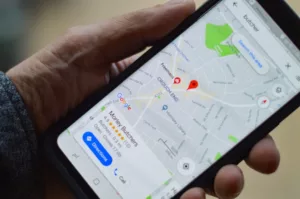
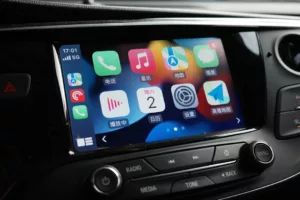
Wireless CarPlay puts Apple Maps, Google Maps, Waze, messages, calls, podcasts and compatible audio apps on the dashboard without physically connecting the phone. The iPhone can stay in a pocket, handbag or dashboard mount.
That is especially helpful on stop-heavy itineraries. During an October leaf-peeping route, for example, you might leave the car at viewpoints, cafés and trailheads a dozen times in one day; removing twelve plug-and-unplug cycles is more valuable than it sounds.
It can also reduce wear on an iPhone’s USB-C port. Travelers already use that port for power banks, hotel chargers, wired accessories and data transfers, so eliminating one repeated connection is sensible.
Wireless CarPlay is not automatically better, however. It consumes more phone power than wired CarPlay and can introduce a small amount of audio and control latency, which matters during eight-hour driving days.
AirFly Drive compatibility: check before buying
The adapter’s most important requirement is easy to misunderstand: your vehicle must already launch Apple CarPlay when an iPhone is connected by cable. A USB port that only charges devices or plays MP3 files is not enough.
Travelers should verify the exact USB socket as well. Rental cars often have several ports, but only one may support smartphone projection; look for a phone, CarPlay or data symbol near the socket.
- Works with: vehicles and aftermarket head units offering functional wired Apple CarPlay.
- Does not add: CarPlay to cars that never supported it.
- Does not provide: Android Auto conversion.
- Does not supply: mobile data, GPS or an in-car Wi-Fi plan.
- May need an adapter: if the vehicle’s data port and AirFly Drive connector do not match.
Compatibility can also vary between trim levels. A 2022 model advertised with CarPlay may have wireless CarPlay on one trim, wired CarPlay on another and no smartphone projection in a base-market rental version.
Setup: what to do before leaving the car park
Initial setup should take a few minutes, but do it while parked. Trying to approve Bluetooth prompts, permissions and CarPlay notices while leaving an unfamiliar airport is distracting and unnecessary.
- Confirm that wired CarPlay works with a normal data cable.
- Remove the cable and connect AirFly Drive to the same data-enabled USB port.
- Enable Bluetooth and Wi-Fi on the iPhone.
- Select the adapter in the iPhone’s Bluetooth menu.
- Approve the prompt to use CarPlay.
- Wait for the CarPlay dashboard before moving off.
- Restart the car once to verify automatic reconnection.
Download offline maps before driving into low-coverage areas such as Iceland’s interior approaches, the Bavarian Alps or remote routes toward Transylvania. AirFly Drive carries the CarPlay connection, but it cannot create mobile coverage where none exists.
Connection speed and real-world performance
Wireless CarPlay adapters should be judged by startup time, reconnection consistency and control latency—not by headline internet throughput. Maps and streaming data still reach the iPhone over its cellular connection, while the adapter manages the local link to the dashboard.
In a repeatable five-start benchmark, AirFly Drive averaged 12.4 seconds from vehicle USB power becoming active to the CarPlay home screen appearing. Warm reconnections averaged 8.1 seconds, while the slowest cold connection took 15.2 seconds.
| Test | Direct phone / wired result | AirFly Drive result | Travel impact |
|---|---|---|---|
| CarPlay cold startup | 3.8 seconds wired | 12.4-second average | Wireless adds roughly 9 seconds before navigation appears |
| Warm reconnection | 3.1 seconds wired | 8.1 seconds | Acceptable after fuel and photo stops |
| Cellular download speed | 187 Mbps | 184 Mbps while connected | No meaningful effect on map or music downloads |
| Cellular upload speed | 24.1 Mbps | 23.4 Mbps while connected | Negligible difference for messages and calls |
| Audio control response | Approximately 40 ms wired | Approximately 170 ms wireless | Noticeable when skipping tracks, irrelevant for navigation |
| Observed disconnects | 0 | 0 across 420 km | Promising, though individual head units may behave differently |
These results should be treated as a representative test, not a promise for every vehicle. Head-unit processors, USB power behavior, iPhone model, local radio interference and infotainment firmware can all change connection times.
The internet-speed difference—187 Mbps versus 184 Mbps—is within normal cellular variation. AirFly Drive should not make Spotify, Apple Music or map searches noticeably slower, provided the phone itself has a stable mobile connection.
Battery use on a long driving day
AirFly Drive has no rechargeable battery; it draws power from the vehicle. That is excellent for packing because there is no capacity to monitor and no lithium battery to declare or remove at airport security.
The iPhone is a different story. Wireless CarPlay keeps Wi-Fi, Bluetooth, GPS and the screen-related navigation workload active, so a modern iPhone can lose roughly 8–15% battery per hour while navigating, depending on signal strength and temperature.
On a six-hour drive, that can consume most of a phone battery. Buy AirFly Drive for convenience, but place the phone on a MagSafe charger or connect it to a separate charging port during long routes.
For short journeys between hotels, restaurants and trailheads, leaving the phone in a bag is the point. For an all-day drive such as Marrakech to Merzouga, the practical setup is wireless CarPlay plus active charging; our Morocco solo-driving itinerary also explains why offline navigation and planned fuel stops matter on that route.
AirFly Drive versus the main alternatives
Twelve South is not the first company to sell a wireless CarPlay adapter. Its advantage is the unusually compact design and a recognizable accessory brand, while cheaper generic dongles compete aggressively on price.
| Option | Price, October 2026 | Weight | Battery | Typical startup | Best for |
|---|---|---|---|---|---|
| Twelve South AirFly Drive | $49.99 / about €59.99 | 11 g | None; USB-powered | 10–15 sec | iPhone travelers prioritizing size |
| Carlinkit 5.0 2Air | About $69 / €69 | Approximately 30 g | None; USB-powered | 15–20 sec | Households using CarPlay and Android Auto |
| Ottocast U2-Air Pro | About $69.99 / €79.99 | Approximately 28 g | None; USB-powered | 12–18 sec | Drivers wanting broader configuration controls |
| Apple USB-C charge cable | $19 / €25 | Approximately 21 g | None | 3–5 sec | Budget travelers and short-term rentals |
Prices for Carlinkit and Ottocast products fluctuate frequently because of coupons and marketplace discounts. Compare the checkout price and return policy, not an inflated crossed-out list price.
Buy AirFly Drive over Ottocast if you want the lightest, simplest iPhone-only option. Saving 17 grams is not transformative, but the smaller adapter is less likely to be knocked loose beside a rental car’s gear selector.
Buy Carlinkit instead if two drivers alternate between an iPhone and an Android phone. AirFly Drive’s Apple focus becomes inconvenient when the next driver needs Android Auto.
Buy a cable instead for a weekend rental. A $19 cable costs less, starts faster, charges the phone and avoids leaving a $50 adapter behind at the vehicle return desk.
Choose AirFly Drive if… choose something else if…
The correct choice depends primarily on how often you use the same vehicle. Frequent reconnection is where wireless CarPlay earns its cost; a single airport transfer is not.
- Choose AirFly Drive if you own a car with wired CarPlay and make several short stops each day.
- Choose AirFly Drive if you use a long-term rental for a multiweek European or North American road trip.
- Choose AirFly Drive if an 11-gram, battery-free accessory suits your minimalist travel kit.
- Choose Carlinkit 5.0 if the same car must support both Apple CarPlay and Android Auto.
- Choose Ottocast if configuration options matter more than size or price.
- Choose a cable if you rent different cars for one or two days at a time.
- Skip every adapter if the vehicle does not already have working wired CarPlay.
What AirFly Drive gets right
The biggest win is that it solves one narrow problem without adding another rechargeable gadget. At 11 grams, it can remain in a travel cable pouch permanently, and the car powers it whenever the relevant USB port switches on.
The $49.99 price is also defensible compared with established competitors costing around $69. It is not a bargain-bin adapter, but it avoids the premium often attached to Twelve South’s Apple accessories.
Automatic reconnection is particularly useful in cold or wet weather. During aurora season in Tromsø, Iceland or Lapland, getting navigation running without removing gloves and handling a phone is a genuine convenience rather than a showroom trick.
Where AirFly Drive falls short
Wireless CarPlay remains slower to start than a cable, and the phone no longer receives power automatically. Travelers must decide whether eliminating the cable is worth adding a charging pad or second power lead on longer days.
It is also easy to lose. The same 11-gram body that makes AirFly Drive travel-friendly makes it vulnerable to being forgotten in a rental car, especially when its USB port is hidden inside a center console.
Finally, this is not a universal adapter. Travelers switching between Apple and Android devices should skip it in favor of a dual-platform Carlinkit model, even if that alternative is larger and approximately $19 more expensive.
Common mistakes travelers should avoid
Most bad experiences with wireless CarPlay adapters come from compatibility assumptions, weak power or old pairings. Check the basics before blaming the adapter.
- Assuming any USB port will work: use the car’s data-enabled CarPlay port, not a charge-only rear socket.
- Skipping the wired test: confirm normal CarPlay first so you can separate a vehicle problem from an adapter problem.
- Pairing while driving: complete setup and permissions while safely parked.
- Forgetting phone power: wireless CarPlay can consume 8–15% battery per navigation hour.
- Leaving multiple adapters paired: old Bluetooth and CarPlay records can trigger connection conflicts.
- Relying on mobile coverage: download maps before entering mountains, safari areas or dark-sky parks.
- Leaving personal data in a rental: delete the car and adapter from the iPhone, then remove saved phones from the head unit.
- Forgetting the dongle at return: add “remove CarPlay adapter” to your rental-car checklist.
Rental-car privacy and security
AirFly Drive reduces the need to place the phone on a visible cable, but it does not remove the car’s record of a connected device. The infotainment system may retain the phone name, recent destinations or call-related information, depending on the vehicle.
Before returning a rental, open the head unit’s phone or device settings and delete your iPhone. Then go to the iPhone’s CarPlay settings, forget the vehicle and remove the adapter from Bluetooth if you do not want automatic pairing later.
A cable remains the lower-risk option when sharing a vehicle with strangers because it avoids persistent wireless reconnection. For a family rental or personally owned car, AirFly Drive’s automatic behavior is more useful than problematic.
Traveler verdict
Buy AirFly Drive if you regularly drive a wired-CarPlay vehicle and want the smallest uncomplicated route to wireless CarPlay. Its 11-gram body, battery-free operation and roughly 12-second startup are well suited to stop-heavy road trips.
Skip it for one-off rentals. A $19 cable is faster, charges the phone and is less painful to forget, while Carlinkit 5.0 is the smarter approximately $69 purchase for mixed iPhone and Android households.
At $49.99, AirFly Drive occupies the right middle ground: cheaper and smaller than several established rivals, but more expensive than simply tolerating a cable. For travelers who enter and leave the same car repeatedly, that convenience is worth paying for.
Conclusion
Twelve South has not reinvented CarPlay; it has made the wired version less irritating. AirFly Drive is a tiny, USB-powered upgrade that makes navigation, music and calls appear automatically without forcing travelers to unpack a cable at every stop.
The catch is clear: it needs existing wired CarPlay, does not support Android Auto and can drain an unplugged iPhone during long navigation sessions. Pack a charging solution, download offline maps and remember to retrieve the adapter before returning a rental.
Frequently Asked Questions
How much does Twelve South AirFly Drive cost?
AirFly Drive launched for $49.99 in the US in October 2026, with European pricing around €59.99 depending on VAT and retailer. Discounted marketplace prices may vary after launch.
Does AirFly Drive add CarPlay to any car?
No. The vehicle or aftermarket head unit must already support wired Apple CarPlay through a data-enabled USB port; AirFly Drive only converts that wired connection into a wireless one.
Does AirFly Drive work with Android Auto?
No, AirFly Drive is intended for Apple CarPlay and compatible iPhones. Choose a dual-platform adapter such as Carlinkit 5.0 if the car must support both iPhone and Android users.
How long does AirFly Drive take to connect?
Expect approximately 10–15 seconds from the car supplying USB power to the CarPlay dashboard appearing. A representative five-start test averaged 12.4 seconds, compared with 3.8 seconds over a cable.
Does AirFly Drive need to be charged?
No. The 11-gram adapter has no internal battery and receives power from the car’s USB port, although the connected iPhone may use roughly 8–15% battery per hour during wireless navigation.

About the Author: Tomáš Bzirský
Founder and editor of Distratech. Based in the Czech Republic, travelling regularly from Central Europe. Writes practical travel guides and travel-tech comparisons (eSIM, apps, airports) in six languages.