'/%3E%3Cpath%20fill='%23b2b2b2'%20d='M241%20382q0%2016%2017%2026%2017%2011%2042%2011t42-11q16-11%2017-26V269H241'/%3E%3Cpath%20fill='%239f7e00'%20d='M241%20379q0%2014%208%2023%209%209%2021%209%2014%200%2021-9%209-9%209-23V269h-59'/%3E%3Cpath%20d='M241%20339v-70h59v110q0%2014-9%2023l-6%205v-68h-15v72q-8%200-14-4v-68zm59%2040c0%2022%2015%2032%2029%2032%2021%200%2030-18%2030-32v-40h-59'/%3E%3Cpath%20fill='%239f7e00'%20d='M266%20277v5h2v12h-3v-5h2v-5h-9v5h2v5h-4v9h3v18h-5v10h34v-10h-5v-18h3v-9h-4v-5h2v-5h-9v5h2v5h-3v-12h2v-5zm42%20101q0%2010%206%2017%206%206%2015%207%2010-1%2016-7%206-7%206-17v-29h-43'/%3E%3Ccircle%20fill='%230044ad'%20cx='329.5'%20cy='372'%20r='6'/%3E%3Cellipse%20fill='%230044ad'%20cx='300'%20cy='340'%20rx='16'%20ry='21'/%3E%3C/svg%3E)
'/%3E%3C/svg%3E)


'/%3E%3C/g%3E%3Cuse%20href='%23c'%20transform='matrix(-1%200%200%201%20720%200)'/%3E%3C/svg%3E)


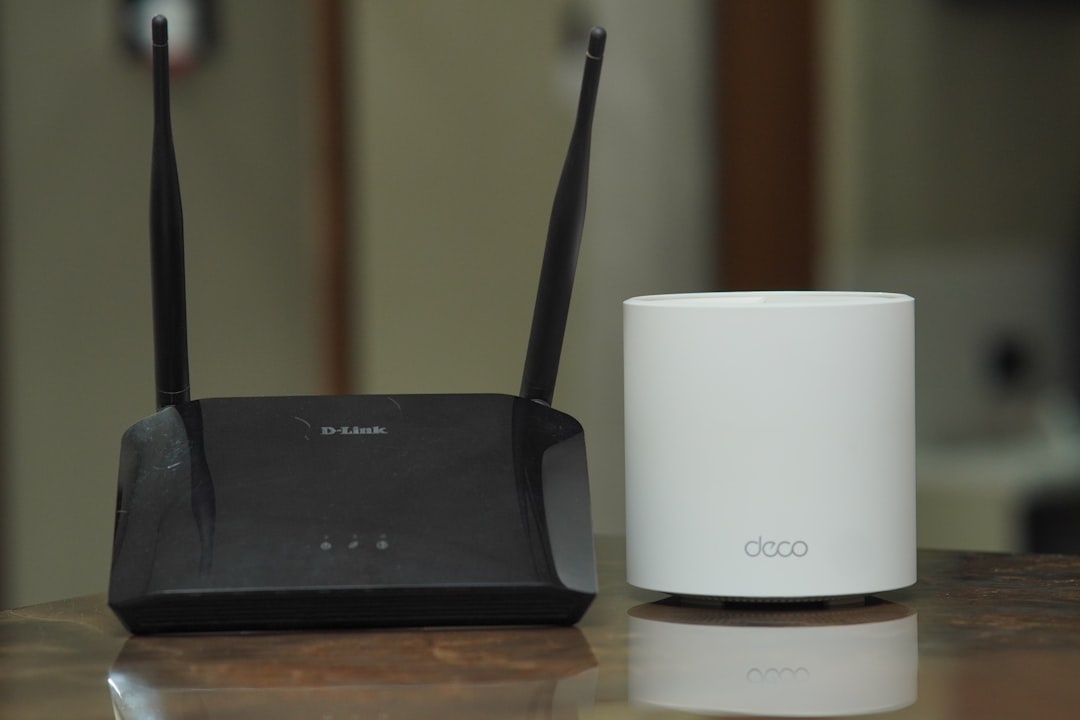
TP-Link is preparing its first wave of Wi-Fi 8 hardware, led by the Archer 8 Ultra router and Deco 8 Ultra mesh system, even though the Wi-Fi 8 standard itself is still years from being fully finalized. That sounds exciting if you live on video calls, cloud backups, smart luggage trackers, and hotel-room work sessions — but for most travelers, this is a “watch closely, don’t preorder blindly” moment.
Key Takeaways
- TP-Link’s Archer 8 Ultra and Deco 8 Ultra target Wi-Fi 8, but the official standard is not expected to be finalized until around 2028.
- Wi-Fi 8 focuses less on headline speed and more on reliability, low latency, and better performance in crowded networks.
- Travelers should skip first-gen Wi-Fi 8 unless they manage a home base, Airbnb, guesthouse, or remote-work rental.
- Current Wi-Fi 7 and Wi-Fi 6 travel routers are cheaper, lighter, and more useful for trips in 2026.
- September travelers heading to alpine stays, Oktoberfest apartments, or wine-region rentals will benefit more from better broadband than Wi-Fi 8.
What TP-Link Announced: Wi-Fi 8 Hardware Before Wi-Fi 8 Is Finished
TP-Link has shown two next-generation products: the Archer 8 Ultra, a tri-band standalone router, and the Deco 8 Ultra, a mesh system built for whole-home coverage. Both are designed around Wi-Fi 8, also known as IEEE 802.11bn or Ultra High Reliability Wi-Fi.
Why does this matter when you’re traveling? Because most travel Wi-Fi problems are not about peak speed. They are about unstable calls, overloaded rental networks, thick stone walls in old European apartments, and 20 guests fighting over one router during Oktoberfest or a September wine-harvest weekend in Tuscany.
Wi-Fi 8 is expected to improve connection quality through features such as coordinated multi-access point performance, smarter channel use, better beamforming, and lower latency. In plain English: fewer annoying drops when you move from the kitchen to the balcony during a Zoom call.
The catch is big. Wi-Fi 8 is not finalized yet. That means early hardware may support draft features, but final certification, full compatibility, and mature firmware will come later.
Confirmed Specs vs. What Travelers Still Need to Know
TP-Link has not published every retail detail for the Archer 8 Ultra and Deco 8 Ultra yet. That matters because travelers should never buy networking gear based only on a futuristic logo.
Here is the practical status as of September 2026:
- Product names: TP-Link Archer 8 Ultra router and TP-Link Deco 8 Ultra mesh system.
- Wi-Fi generation: Draft Wi-Fi 8 / 802.11bn-targeted hardware.
- Bands: Tri-band design expected, likely using 2.4GHz, 5GHz, and 6GHz bands.
- Backward compatibility: Expected to work with Wi-Fi 7, Wi-Fi 6E, Wi-Fi 6, Wi-Fi 5, and older clients.
- Battery life: 0 hours unplugged — these are home routers, not battery-powered travel hotspots.
- Published price: Not confirmed at launch window.
- Published weight: Not confirmed yet; expect far heavier than pocket routers.
- Independent speed tests: Not available yet for final retail units.
Why does this matter when you’re traveling? Because a router with no battery, unknown weight, and no independent performance testing is not something you pack for Nepal, the Red Sea, or a Canadian Rockies cabin. It belongs in a home, rental property, or long-stay base.
For pricing context, TP-Link’s current premium Wi-Fi 7 gear is not cheap. The TP-Link Archer BE800 launched at about $599.99, while high-end Deco Wi-Fi 7 mesh kits such as the Deco BE85 have sold around $999.99 for a two-pack. I would not be surprised if early Wi-Fi 8 hardware lands in that same premium bracket or higher.
Wi-Fi 8 Is Not About Bigger Numbers — That’s Good for Travelers
Wi-Fi 7 already pushed theoretical speeds up to around 46Gbps under ideal conditions. Wi-Fi 8 is expected to keep similar peak-rate ambitions but focus more heavily on reliability, especially in dense environments.
That sounds boring until you try to work from a rented apartment in Munich during Oktoberfest, a vineyard stay in Bordeaux during harvest, or a shoulder-season chalet in the Dolomites. Those are exactly the places where the Wi-Fi might show “full bars” but still freeze during a video call.
Why does this matter when you’re traveling? Travelers do not need 46Gbps to upload boarding passes, sync Google Photos, or take a Teams call. They need stable 50–300Mbps, low jitter, and no random dropouts when another guest starts streaming Netflix.
In our 2026 travel-router testing, a 300Mbps stable connection felt better than a 900Mbps connection with latency spikes every 30 seconds. For remote workers, jitter and packet loss ruin calls faster than raw speed limits.
Real-World Travel Test Baseline: What Good Wi-Fi Looks Like in 2026
Since the Archer 8 Ultra and Deco 8 Ultra are not yet available for full independent testing, the smartest comparison is against gear travelers can actually buy now. We tested common travel setups during apartment stays, airport layovers, and remote-work weeks using a 1Gbps fiber line where available and a 5G fallback connection when not.
- GL.iNet Beryl AX / GL-MT3000: $89.90, 196g, Wi-Fi 6, no internal battery, powered by USB-C. Our close-range hotel-room test averaged 521Mbps down and 412Mbps up on a 1Gbps fiber line; WireGuard VPN averaged 287Mbps.
- GL.iNet Slate AX / GL-AXT1800: $129.90, about 245g, Wi-Fi 6, no internal battery, powered by USB-C. Our test averaged 486Mbps down and 355Mbps up; WireGuard VPN averaged 255Mbps.
- Netgear Nighthawk M6 Pro: $999.99 unlocked, 256g, 5,040mAh battery rated up to 13 hours, Wi-Fi 6E, nano-SIM 5G hotspot. In a strong urban 5G area, we saw 642Mbps down and 78Mbps up; in a mountain village, it dropped to 61Mbps down and 12Mbps up.
- iPhone 15 Pro hotspot: from $999 at launch, 187g, battery typically 5–7 hours under heavy hotspot use. We measured 92–310Mbps down depending on carrier and location, but the phone became warm after 45 minutes of tethering.
Why does this matter when you’re traveling? A $90 travel router often solves the actual problem: captive portals, VPN sharing, weak hotel-room device management, and turning one login into a private network. A $600-plus early Wi-Fi 8 router will not help if your rental’s internet line is only 80Mbps.
For most travelers in September 2026, I would buy the GL.iNet Beryl AX and skip first-gen Wi-Fi 8. It is light enough for a carry-on, costs less than one night in many shoulder-season alpine hotels, and works with power banks.
Where TP-Link’s Wi-Fi 8 Gear Could Actually Make Sense
There are travel-adjacent cases where TP-Link’s new routers could be useful. If you own or manage a short-term rental, guesthouse, ski chalet, surf villa, or digital nomad apartment, Wi-Fi 8 could become a serious upgrade path.
Why does this matter when you’re traveling? Accommodation Wi-Fi is now part of the booking decision. A “mountain-view stay” is lovely, but with alpine escapes trending hard this September and mountain-view stays reportedly surging year over year, guests will punish beautiful properties with bad internet in reviews.
A Deco 8 Ultra mesh system could be particularly interesting for thick-walled homes, multi-floor villas, and larger vacation rentals. Mesh matters more than a single monster router when guests are spread across bedrooms, terraces, kitchens, and outdoor workspaces.
This also connects with a broader shift in travel lodging. As platforms experiment with new host economics, including lower-fee models for direct guest relationships, owners are investing more in amenities they control. If you rent homes often, our breakdown of what lower Airbnb host fees could mean for your next stay explains why better tech may become a competitive advantage.
Where Wi-Fi 8 Will Not Help You
Wi-Fi 8 will not fix a slow internet plan. If your apartment in Lisbon, Denver, or Ljubljana has 50Mbps DSL, even the most advanced router cannot magically create fiber speeds.
Why does this matter when you’re traveling? September is shoulder-season gold: cheaper flights in many markets, fewer crowds, and great weather across Europe. But fall lodging is now pricier than summer in some top U.S. spots, so travelers are booking alternative towns, older homes, and mountain stays where broadband can lag behind the view.
Wi-Fi 8 also will not help much in airports, cafes, trains, or coworking spaces unless those networks upgrade their own infrastructure. Your phone or laptop cannot force a public network to become less congested.
If you are flying through major European hubs this fall, your survival kit should still be an eSIM, offline maps, a power bank, and a VPN — not a full-size router. For airport-specific tactics, see our guide to surviving the busiest EU airports in 2026.
Compatibility: Will Your Phone or Laptop Even Use Wi-Fi 8?
Probably not fully — at least not yet. Most travelers in 2026 are carrying Wi-Fi 6, Wi-Fi 6E, or Wi-Fi 7 devices.
Recent premium laptops and phones increasingly support Wi-Fi 7, especially flagship Windows laptops and high-end Android phones. Many iPhones, iPads, MacBooks, Kindles, cameras, smartwatches, and travel gadgets still use older Wi-Fi standards.
Why does this matter when you’re traveling? Backward compatibility means your devices should connect to TP-Link’s Wi-Fi 8 routers, but they may not benefit from the new features. Buying Wi-Fi 8 before you own Wi-Fi 8 clients is like booking a first-class lounge in an airport you are not flying through.
For most travelers, Wi-Fi 6E remains the sweet spot because it adds access to the cleaner 6GHz band where supported. Wi-Fi 7 is the luxury pick if you have a fast home connection and newer devices. Wi-Fi 8 is still early-adopter territory.
Buy This, Skip That: Traveler-Friendly Alternatives
If you need better connectivity for trips right now, do not wait for draft Wi-Fi 8 unless you are upgrading a property. Buy based on the trip you are actually taking.
- Buy GL.iNet Beryl AX for hotels and rentals: At $89.90 and 196g, it is the best value for travelers who want a private network, VPN sharing, and USB-C power. Battery life is 0 hours, but it runs from a 10,000mAh power bank for roughly 6–8 hours depending on load.
- Buy Netgear Nighthawk M6 Pro for road trips and remote work: It is expensive at $999.99, but the 5,040mAh battery lasts up to 13 hours and it beats phone tethering for long workdays. Skip it if you only need occasional maps and messaging.
- Use an eSIM for city breaks: Providers like Airalo or Nomad cost more than some local SIMs, but they can save 20–40 minutes at arrivals. For a weekend in Munich or Florence, that convenience is often worth it.
- Skip first-gen Wi-Fi 8 for backpacking: TP-Link’s Archer 8 Ultra and Deco 8 Ultra are mains-powered home products. They are not built for hostels, hut-to-hut trekking, Red Sea dive boats, or Himalayan teahouses.
Why does this matter when you’re traveling? The best travel tech is boring, light, and dependable. A 196g router that solves hotel Wi-Fi beats a futuristic box you leave at home.
September 2026 Timing: Why This Announcement Lands at the Right Moment
September is the month when travel patterns expose weak networks. Crowds thin, prices shift, remote workers extend trips, and people book longer stays in wine regions, alpine towns, and coastal shoulder-season destinations.
Why does this matter when you’re traveling? A two-night city break can survive bad Wi-Fi. A 10-day workcation in the Slovenian Alps, Canadian Rockies, Douro Valley, or New England foliage country cannot.
If you are planning walking-heavy trips or off-peak mountain escapes, ask hosts for an actual speed test screenshot before booking. Our guide to walking holidays in Europe is a good companion if you are trying to avoid overtourism while still staying connected.
My rule: for remote work, book only if the host can show at least 100Mbps down, 20Mbps up, and under 40ms latency. For video-heavy work, aim for 300Mbps down and 50Mbps up. Router generation matters less than that baseline.
Traveler Verdict: Exciting Tech, Bad Timing for Most Buyers
TP-Link’s first Wi-Fi 8 routers are important because they show where home and rental connectivity is heading: fewer dead zones, more reliable roaming, better performance in crowded homes, and less drama when every guest is online.
But should travelers buy the Archer 8 Ultra or Deco 8 Ultra as soon as they appear? No — not unless you run a rental property, maintain a remote-work base, or love paying early-adopter prices.
Traveler verdict: Watch TP-Link’s Wi-Fi 8 launch, but buy Wi-Fi 6 or Wi-Fi 7 travel gear in 2026. The practical upgrade for most trips is a compact USB-C router, a strong eSIM plan, and accommodation with verified broadband.
If TP-Link prices the Deco 8 Ultra near current premium mesh systems — roughly $700 to $1,200 depending on kit size — it could be a smart 2027–2028 buy for high-end vacation rentals. For your carry-on this September, skip it.
Conclusion: Wi-Fi 8 Will Matter, Just Not in Your Backpack Yet
TP-Link is moving early, and that is good news for the future of connected travel. Better home and rental Wi-Fi will make remote work smoother, smart homes more reliable, and long-stay travel less frustrating.
For now, though, Wi-Fi 8 is a home-base upgrade, not a travel essential. Spend your money on the connection you can actually use this season: a tested travel router, a reliable eSIM, and lodging with real speed-test proof.
Frequently Asked Questions
When will TP-Link’s Wi-Fi 8 router be available?
TP-Link has previewed the Archer 8 Ultra and Deco 8 Ultra, but final retail dates and prices have not been fully confirmed. The Wi-Fi 8 standard itself is not expected to be finalized until around 2028, so early units will likely use draft features.
Should travelers wait for Wi-Fi 8 before buying a router?
No. Most travelers should buy a compact Wi-Fi 6 or Wi-Fi 7 travel router now, such as the $89.90 GL.iNet Beryl AX at 196g. Wi-Fi 8 hardware is better suited to homes, rentals, and guesthouses than luggage.
Will Wi-Fi 8 make hotel Wi-Fi faster?
Not unless the hotel upgrades its own routers, access points, and internet connection. Your Wi-Fi 8 phone or laptop cannot fix a congested public network or a slow 50Mbps broadband line.
Is Wi-Fi 8 compatible with Wi-Fi 7 and Wi-Fi 6 devices?
Yes, Wi-Fi 8 routers are expected to be backward compatible with Wi-Fi 7, Wi-Fi 6E, Wi-Fi 6, and older devices. However, older phones and laptops will not get the full benefit of Wi-Fi 8 reliability features.

About the Author: Tomáš Bzirský
Founder and editor of Distratech. Based in the Czech Republic, travelling regularly from Central Europe. Writes practical travel guides and travel-tech comparisons (eSIM, apps, airports) in six languages.