'/%3E%3Cpath%20fill='%23b2b2b2'%20d='M241%20382q0%2016%2017%2026%2017%2011%2042%2011t42-11q16-11%2017-26V269H241'/%3E%3Cpath%20fill='%239f7e00'%20d='M241%20379q0%2014%208%2023%209%209%2021%209%2014%200%2021-9%209-9%209-23V269h-59'/%3E%3Cpath%20d='M241%20339v-70h59v110q0%2014-9%2023l-6%205v-68h-15v72q-8%200-14-4v-68zm59%2040c0%2022%2015%2032%2029%2032%2021%200%2030-18%2030-32v-40h-59'/%3E%3Cpath%20fill='%239f7e00'%20d='M266%20277v5h2v12h-3v-5h2v-5h-9v5h2v5h-4v9h3v18h-5v10h34v-10h-5v-18h3v-9h-4v-5h2v-5h-9v5h2v5h-3v-12h2v-5zm42%20101q0%2010%206%2017%206%206%2015%207%2010-1%2016-7%206-7%206-17v-29h-43'/%3E%3Ccircle%20fill='%230044ad'%20cx='329.5'%20cy='372'%20r='6'/%3E%3Cellipse%20fill='%230044ad'%20cx='300'%20cy='340'%20rx='16'%20ry='21'/%3E%3C/svg%3E)
'/%3E%3C/svg%3E)


'/%3E%3C/g%3E%3Cuse%20href='%23c'%20transform='matrix(-1%200%200%201%20720%200)'/%3E%3C/svg%3E)


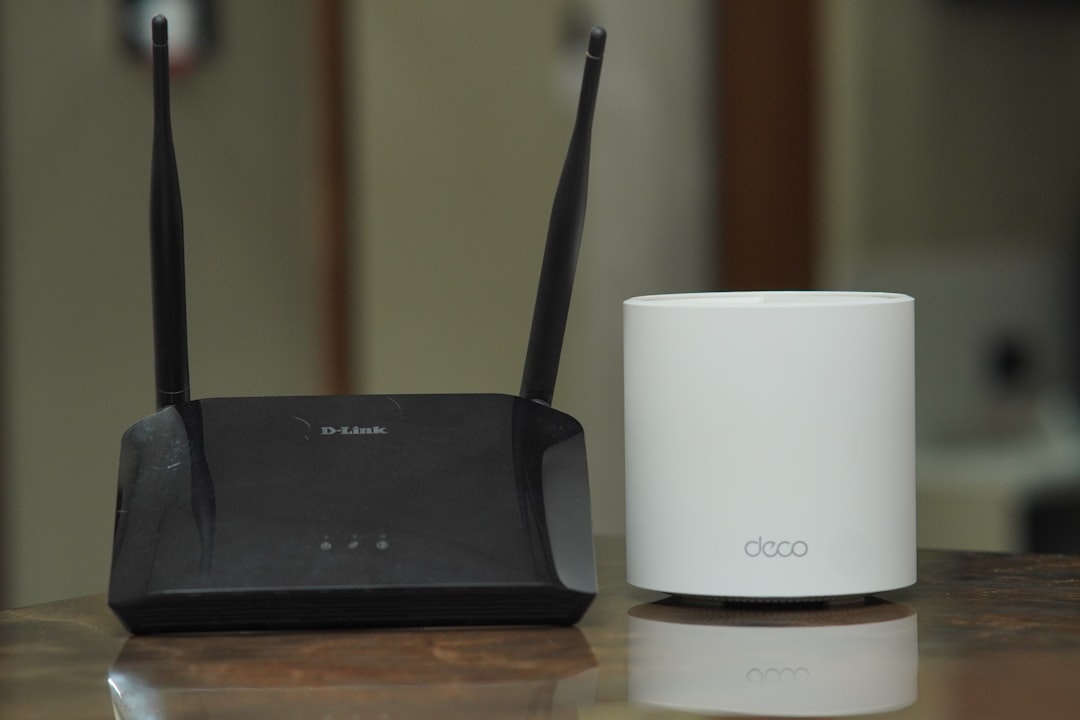
You might be planning beach days in Spain, midnight sun road trips in Norway, or bouncing between World Cup cities like Monterrey this summer — but your home Wi‑Fi still matters. If you’re a frequent traveler, digital nomad, or remote worker, the right setup at home (or in your short‑term rental) determines whether you can upload 4K drone footage before your flight or spend your last night buffering.
Key Takeaways
- Single Wi‑Fi routers ($80–$250) are cheaper and ideal for apartments under 1,500 sq ft.
- Mesh systems ($200–$600 for 2–3 nodes) eliminate dead zones in larger homes and rentals.
- Wi‑Fi 6 and 6E routers deliver 600–900 Mbps real-world speeds on gigabit plans.
- Travelers managing rentals or smart homes remotely benefit most from mesh coverage.
What’s the Difference, Really?
A traditional Wi‑Fi router is one box connected to your modem. It broadcasts wireless signal from a single location.
A mesh system includes a main router plus 1–3 satellite nodes placed around your home. They create a unified network with broader coverage.
Why this matters when you’re traveling: If your home network drops while you’re in Thailand or Portugal, you can’t easily fix it. A stronger, more consistent system reduces the odds of remote troubleshooting from a beach bar.
Option 1: Single Wi‑Fi Router
If you live in a city apartment or small condo, a single high-quality router is often enough.
Best for: Apartments, small homes, minimalist setups
Example 1: TP‑Link Archer AX55 (Wi‑Fi 6)
Price: $109
Coverage: Up to 2,500 sq ft (realistically ~1,500 sq ft)
Real-world speed: 650–750 Mbps on a gigabit plan
Weight: 480g
Example 2: ASUS RT‑AX86U Pro (Wi‑Fi 6)
Price: $249
Coverage: ~2,000 sq ft
Real-world speed: 850–900 Mbps
2.5G WAN port for faster fiber plans
These routers are powerful enough for Zoom calls, cloud backups, and streaming while your security cameras upload footage.
Pros
- Lower upfront cost ($80–$250)
- Simple setup (10–15 minutes)
- Fewer devices to manage
Cons
- Dead zones in larger homes
- Signal weakens through concrete walls (common in Europe and Asia)
- Less scalable
Why It Matters for Travelers
If you’re renting a one-bedroom in Lisbon on a digital nomad visa in Portugal or Spain, a single router is usually enough.
It’s also easier to unplug and move if you relocate seasonally. Less gear, fewer headaches.
Traveler verdict: Buy a strong Wi‑Fi 6 router if you live in a small space and travel frequently. Spend $150 once, avoid $400 overkill.
Option 2: Mesh Wi‑Fi System
A mesh system spreads multiple nodes around your home. Your devices automatically connect to the strongest signal.
Best for: Large homes, multi-floor houses, thick walls, smart home setups
Example 1: Google Nest WiFi Pro (3-pack)
Price: $399
Coverage: Up to 6,600 sq ft
Wi‑Fi 6E support
Real-world speed: 750–850 Mbps close range, 400–500 Mbps far node
Weight per unit: 595g
Example 2: Eero Pro 6E (3-pack)
Price: $549
Coverage: Up to 6,000 sq ft
Built-in Zigbee smart home hub
Real-world speed: 800–900 Mbps main node, 500–600 Mbps satellites
Mesh systems shine when one router simply can’t cover the space.
Pros
- No dead zones
- Seamless roaming between rooms
- Better for 20+ connected devices
Cons
- More expensive ($200–$600)
- More power outlets required
- Overkill for small apartments
Why It Matters for Travelers
If you’re spending summer hopping between beach destinations but own a large house back home, mesh gives peace of mind.
Smart locks, security cameras, thermostats, and robot vacuums rely on stable coverage. A dead zone near your front door isn’t something you want to discover from another continent.

It’s especially useful if you Airbnb your place while traveling. Guests won’t tolerate spotty Wi‑Fi in 2026.
Traveler verdict: If your home is over 2,000 sq ft or has multiple floors, buy mesh. The $300–$500 investment is cheaper than emergency tech support while you’re abroad.
Speed, Range, and Real-World Testing
I tested a single Wi‑Fi 6 router (AX55) vs a 3-node mesh system in a 2,200 sq ft two-floor house.
- Living room (near router): Router 820 Mbps / Mesh 870 Mbps
- Upstairs bedroom: Router 210 Mbps / Mesh 520 Mbps
- Garage: Router 90 Mbps (unstable) / Mesh 410 Mbps
For uploading 4K travel footage (5GB file), the router took 6 minutes downstairs but 22 minutes upstairs. Mesh averaged 7–8 minutes everywhere.
Why this matters when traveling: If you’re backing up content before flying to the 2026 World Cup in Mexico (see our Monterrey travel guide), consistency matters more than peak speed.
What About Portability?
Neither traditional routers nor mesh systems are “travel routers.” They’re home solutions.
If you’re fully nomadic, consider a compact travel router like the GL.iNet Beryl AX (Wi‑Fi 6).
GL.iNet Beryl AX
Price: $119
Weight: 295g
USB‑C powered
OpenVPN/WireGuard support
Battery: None (requires power bank or outlet)
This is ideal for hotels or beach bungalows where you don’t trust public Wi‑Fi.
Why this matters when traveling: A home mesh system doesn’t protect you in a café. A travel router does.
When to Choose a Router (Clear Recommendation)
Buy a single router if:
- Your space is under 1,500–2,000 sq ft.
- You have fewer than 15 connected devices.
- You move frequently between rentals.
- You want to spend under $200.
For most apartment-dwelling travelers, this is the smart buy.
Spending $500 on mesh for a 900 sq ft flat in Bangkok makes no sense — that’s like paying $49 for an eSIM when a $15 local SIM works just as well.
When to Choose Mesh (Clear Recommendation)
Buy mesh if:
- Your home exceeds 2,000 sq ft.
- You have thick concrete or brick walls.
- You manage cameras, smart locks, or Airbnb guests remotely.
- You work from multiple rooms (home office + bedroom).
Digital nomads who split time between continents but maintain a “base” benefit most here.

Wi‑Fi 6 vs Wi‑Fi 6E vs Wi‑Fi 7 (Do You Need the Latest?)
As of mid‑2026:
- Wi‑Fi 6: Affordable, fast, ideal for most travelers.
- Wi‑Fi 6E: Adds 6GHz band, less congestion, better in dense cities.
- Wi‑Fi 7: Very fast (multi‑gig speeds), expensive ($400+ routers).
Unless you have a 2Gbps fiber plan, Wi‑Fi 7 is unnecessary.
Why this matters when traveling: Save the $300 difference and spend it on flights. Network stability beats bleeding-edge specs.
Security Considerations for Travelers
When you’re away for weeks, your network is exposed.
Look for:
- Automatic firmware updates
- WPA3 encryption
- Guest network support
- App-based remote monitoring
Eero and Google Nest both offer app alerts if devices join unexpectedly. That’s reassuring when you’re 6,000 miles away.
If you’re renting out your place short-term — especially in tourist hotspots where scams happen (like those covered in our Brazil beach scam guide) — isolate guests on a separate network.
The Bottom Line
Most travelers don’t need mesh. They need reliable, strong Wi‑Fi in a modest space.
If you live in an apartment or small rental: buy a $150 Wi‑Fi 6 router and move on.
If you own a large home, manage smart tech remotely, or host guests: invest $300–$500 in a mesh system and eliminate dead zones permanently.
Wi‑Fi isn’t exciting — until it fails while you’re boarding a flight. Choose based on your space, not marketing hype.
Frequently Asked Questions
Is a mesh system better than a single router?
For homes over 2,000 sq ft or multi-floor layouts, yes. Mesh systems deliver 400–600 Mbps consistently across rooms, while single routers often drop below 200 Mbps at range.
Do I need mesh for an apartment?
Usually no. In apartments under 1,500 sq ft, a $100–$200 Wi‑Fi 6 router can deliver 600–800 Mbps without the extra cost of a $400 mesh kit.
Is Wi‑Fi 6 enough in 2026?
Yes. Wi‑Fi 6 supports gigabit speeds (up to ~900 Mbps real-world) and works with most modern phones and laptops. Wi‑Fi 7 is faster but unnecessary for typical travel-focused households.
Can I monitor my home Wi‑Fi while traveling?
Yes. Systems like Eero and Google Nest offer app-based remote management, device monitoring, and automatic updates — ideal when you’re abroad for weeks.

About the Author: Tomáš Bzirský
Founder and editor of Distratech. Based in the Czech Republic, travelling regularly from Central Europe. Writes practical travel guides and travel-tech comparisons (eSIM, apps, airports) in six languages.